


















Table of Contents
- • Driver Easy Review Summary
- • About Driver Easy
- • Other opinions about Driver Easy
- • Overview of Driver Easy
- • Driver Easy Review
- • Driver Easy Software Reviews
- • Driver Easy Pros & Cons
- • Driver Easy Usage and Features
- • Driver Easy Subscription Model
- • Driver Easy Return Policy
- • Driver Easy Digital Delivery Information
- • Driver Easy Contact Information
- • Where to buy Driver Easy?
- • Conclusion of Driver Easy reviews & ratings
Driver Easy Review Summary
Driver Easy is a Windows driver updater software developed by Easeware that generally aids users in identifying and updating outdated device drivers. It plays a role in enhancing system stability and performance by providing a large driver database and automated update options, although its full capabilities may require a paid Pro version. Overall, it tends to deliver solid performance with a user-friendly interface, but with some functional limitations in the free version.
Highlights
- Suitable for Windows users seeking straightforward driver update tools
- Covers driver scanning, manual and automated updates, backup, and restore features
- Limitations include manual installs and slower downloads in the free version; Pro unlocks automation and bulk updates
- Overall Rating: 7.8/10, balancing ease of use with feature restrictions
Within the wider driver update software category, Driver Easy serves as a mid-tier option emphasizing ease of use and extensive driver support. Alternatives exist for users prioritizing full free functionality or advanced manual management, making it one of several viable choices. For a more detailed perspective, see the Driver Easy review.
About Driver Easy
Computers often face issues from outdated or missing device drivers. These problems can cause hardware to malfunction or slow system performance. Finding the right drivers manually is complex and time-consuming for many users.

Driver Easy is a Windows driver updater developed by Easeware that scans, identifies, and updates device drivers. Positioned as a mid-tier utility, it offers both free manual update options and a paid Pro version for automated updates. The software supports a large driver database and offline scanning capabilities.
Driver Easy has more than 3 million users worldwide and is recognized for its professional customer support and AppEsteem certification. User reviews highlight its ease of use and effective driver detection, though detailed official ratings are not publicly available. The software receives mentions in expert reviews on Lifewire and various user forums.
This tool is suited for Windows users who want to simplify driver maintenance and are willing to pay for added convenience features. However, the free version limits download speeds and requires manual installation. For a comprehensive evaluation, see the Driver Easy review to determine if it fits your needs.
Overview of Driver Easy
Driver Easy is a Windows driver updater software developed by Easeware that identifies and updates outdated device drivers. It operates globally, supporting multiple languages and maintains a large database of over 30 million drivers. The software is distributed directly through its official website as a downloadable product available in free and paid Pro versions.
The tool's primary function is to scan Windows PCs to detect missing or outdated drivers, offering automated download and installation in the Pro version, while the free version provides manual update links. Driver Easy also supports offline scanning for network drivers and includes backup and restore capabilities mainly available in the paid version. It creates restore points before updating to enhance system safety.
Driver Easy fits into the software industry as a mid-tier utility focusing on driver management for a broad range of device types. Its operational model centers on software license sales with customer support provided via its official channels. The software is recognized for maintaining compliance with AppEsteem certification and serves millions of users worldwide as a resource for managing Windows driver updates. The term Driver Easy Review appears in user-generated content but is not part of the software’s official identity.
Driver Easy Review
Driver Easy is a brand known for its Windows driver updater software developed by Easeware, which serves over 3 million users worldwide. It focuses on providing tools to scan, identify, and update outdated or missing device drivers with ease. The brand emphasizes user-friendly solutions for driver management to improve system performance.

The software offers features like offline scanning, creating restore points, and recommending WHQL-certified drivers. Driver Easy positions itself as a reliable utility for both automatic and manual driver updates, supported by responsive customer service and a large driver database. These capabilities aim to help maintain system stability and hardware compatibility across diverse Windows devices.
Driver Easy Highlights- Extensive driver database with 30 million entries
- Support for offline scanning
- Automatic restore point creation
- Combination of manual and automatic updates
- Professional customer support
Driver Easy Software Reviews
Driver Easy is a utility designed for Windows users needing to update device drivers either automatically or manually. It serves both casual users and professionals by providing essential system driver maintenance features.
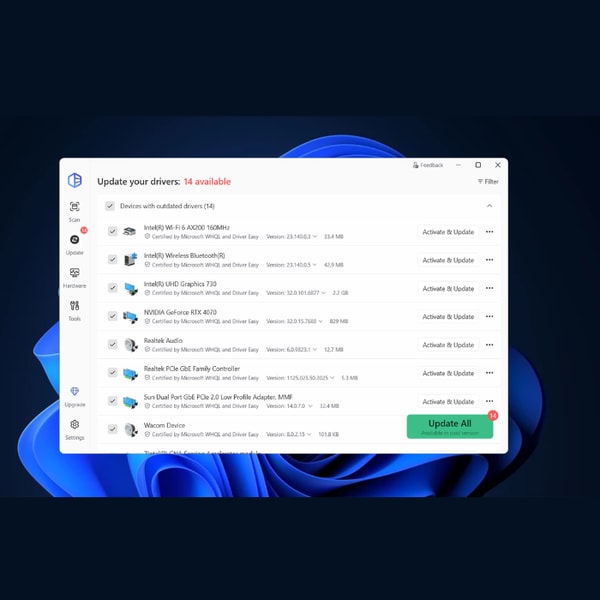
This mid-tier software offers offline scanning, creation of restore points, and driver backup functions, primarily available in its Pro version. It is recognized for its large driver database and extensive hardware support.
The Pro version is priced between 29.95 and 39.95 per year, delivering automatic driver installation and bulk download capabilities. The free version permits scanning and manual driver updates but lacks these automated features.
Price $29.95 • drivereasy.com
Driver Easy Pros & Cons
Driver Easy offers a comprehensive driver database with over 30 million drivers and a simple, user-friendly interface that supports offline scanning. Key features such as automatic restore point creation and driver backup and restore are available in the Pro version, enhancing system safety and flexibility. The software provides WHQL-certified driver recommendations and reliable customer support, making it practical for users seeking straightforward driver maintenance.
However, the free version has notable limitations, including the need for manual driver installation and slow download speeds, which can hinder efficiency. Bulk updates and other advanced features are restricted to the paid Pro version, which requires a yearly subscription. Some users have also expressed concerns over potential bloatware during automated updates, suggesting that those seeking a fully free or more manual experience should consider these trade-offs.
- • Large driver database
- • User-friendly interface
- • Offline scanning capability
- • Automatic restore point creation
- • Backup and restore drivers
- • WHQL-certified driver recommendations
- • Reliable customer support
- • Manual driver installation in free version
- • Slow download speeds in free version
- • Bulk update restricted to Pro
- • Pro requires yearly subscription
- • Potential bloatware concerns
Driver Easy Usage and Features
Driver Easy scans Windows systems to identify outdated, missing, or mismatched drivers that can cause system instability or hardware issues. It supports both automated and manual driver updates to enhance system performance and compatibility. The software also supports offline scanning for network drivers, allowing users to generate update files without an internet connection. It creates restore points before updating drivers to provide a safety backup.
The application recommends WHQL-certified drivers to ensure reliability and security. Key features include automatic or manual driver updates, driver backup and restore utilities, a driver database with over 30 million entries, and offline scan capabilities. These features help balance user convenience with system safety, especially when using the advanced options available in the Pro version.
Driver Easy Subscription Model
Driver Easy uses a freemium license model, providing a free version with limited features and a paid Pro version that unlocks full automation and bulk updates for Windows driver maintenance. The free version allows scanning and manual installation of drivers but limits download speeds and does not support bulk downloads. Pro subscriptions generally cost between $29.95 and $39.95 per year and include automatic updates and additional backup tools.
Model highlights: Free version for basic use, Pro version unlocks automation and faster downloads, and annual subscription pricing. This model is designed for casual users who want to test the software as well as those who prefer the convenience offered by Pro's advanced features.
Driver Easy Return Policy
The return policy details are not explicitly documented. Information on the number of days to initiate a return is unavailable. Fees associated with the return process are also not specified in the available sources.
While a refund policy is mentioned, detailed terms and specific conditions are not provided. There are no clearly stated exclusions related to returns or refunds. Customers seeking more information are advised to consult official support channels for clarification.
Driver Easy Digital Delivery Information
The software is delivered exclusively through direct digital download from the official website and is available globally without geographic restrictions.
After purchase, the software is available for immediate download and activation, which requires an internet connection; no physical shipping is involved.
Driver Easy Contact Information
Users can reach Driver Easy customer support primarily through their official contact page and help center for assistance with technical issues, license keys, driver updates, and refunds.
While direct phone, email, and live chat options are not clearly provided, user reports indicate that response times are generally prompt. Users are encouraged to contact support through the available channels for their inquiries.
Where to buy Driver Easy?
Users can officially purchase Driver Easy through its website, where the presence of account management, accessible support channels, and clear refund policies contribute to a reliable purchase experience. Buying from drivereasy.com ensures direct access to the software and updates, though reliance on online sales means marketplace offers may vary in reliability.
Customers should be aware that alternatives like third-party stores or offline options, if available, could differ in stock, service, or policy details, requiring careful consideration of these factors when choosing where to acquire the software.
Conclusion of Driver Easy reviews & ratings
Driver Easy holds a relevant position in the driver updater software category by offering a straightforward solution with strengths such as a large driver database and the ability to scan offline. Users benefit from features like WHQL-certified driver recommendations and backup functions available in its Pro version.
Those interested in the software can explore its capabilities further while maintaining realistic expectations, with confidence supported by user feedback and expert insights. Readers can also revisit the Driver Easy review to better understand its features and limitations over time.
Editorial notes reflect aggregated buyer feedback and our independent editorial review of publicly available information. They are for informational purposes only and do not constitute endorsements. Purchases are made at your own discretion, and we are not responsible for transactions or outcomes related to this store. Experiences may vary. This content is assisted by AI and reviewed by our editorial team. While we strive for accuracy, AI-supported information may not always be 100% precise, so please verify any critical details.

